Adobe Creative Cloud

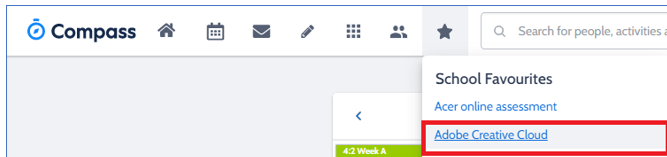
Step 1. 1. Log in to compass → Click on School Favourites  → Click on Adobe Creative Cloud Download
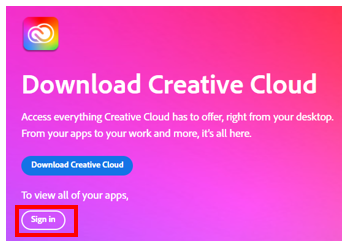
Step 2. – Click on “Download Creative Cloud” once downloaded open to install the Creative Cloud App on your device. 

Step 3. – Once the Application has downloaded and installed, Sign in to it with your Department of Education Login details;

Department of Education email address       :UserName@schools.vic.edu.au 

Password                                                             : Your Department Login Password

You are sent your DET username and password at the start of each year.  Please check your email for an email from IT Support to find this information.

For teachers, please use your @education.vic.gov.au email address

Step 4. Once you have signed in to Adobe Creative Cloud you will see the following options. The programs that are available, and licenced to install will have the “Install” button to allow the program to be installed on your laptop. Click the Install button of the program you require, it will download and install. This may take a little time.